Release Notes: 9.8.7

Our 9.8.7 release introduces Survey Styles for customizing the look of an individual survey, a new set of clearer ISPL aliases, and a round of IntelliBuilder refinements, among many other items.
Survey Building
IntelliBuilder
Four editing views for IntelliBuilder – Review, Edit, Build, and Source
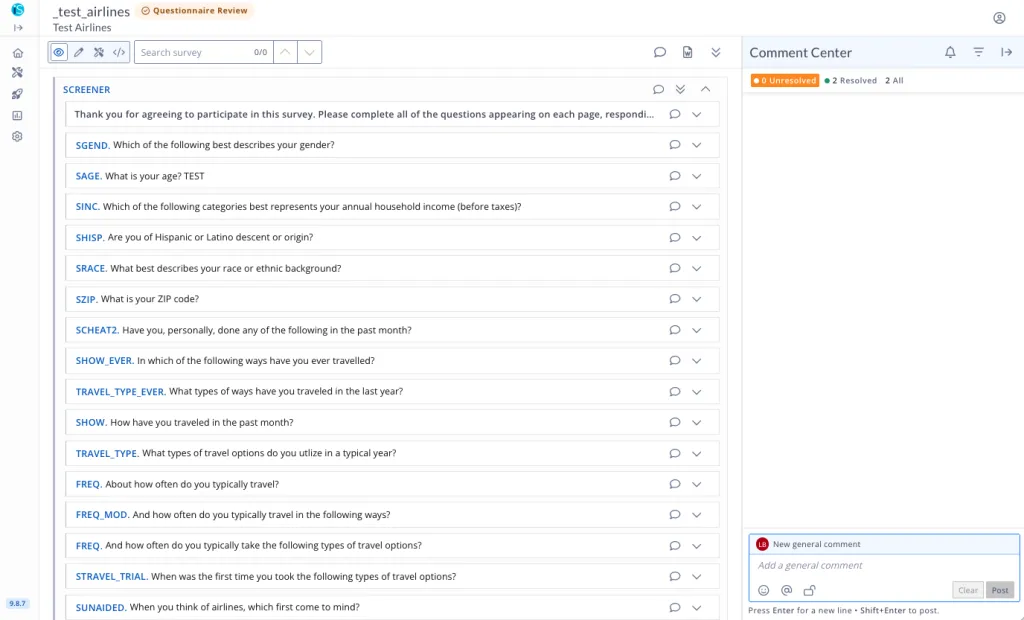
IntelliBuilder now offers four distinct views of a survey, each opening up a bit more editing power than the last:
- Review – read-only, for checking question wording and adding comments
- Edit – adds inline text editing and CopyEditor
- Build – today’s full visual editor
- Source – full ISPL access
Which views someone can reach depends on their permissions, so reviewers, copy editors, and survey builders each land in the view that matches what they’re allowed to do.
Each view also has its own dedicated link (e.g. /visual/edit, /visual/build), so you can send a collaborator straight to the exact stage you want them looking at rather than a generic survey link. Review has also been expanded to show basic question logic – Term if, Qualify if, Show if, Skip if, and option Terminate/Qualify flags – that was previously only visible in the full editor, so reviewers can now see the full picture without needing edit access.
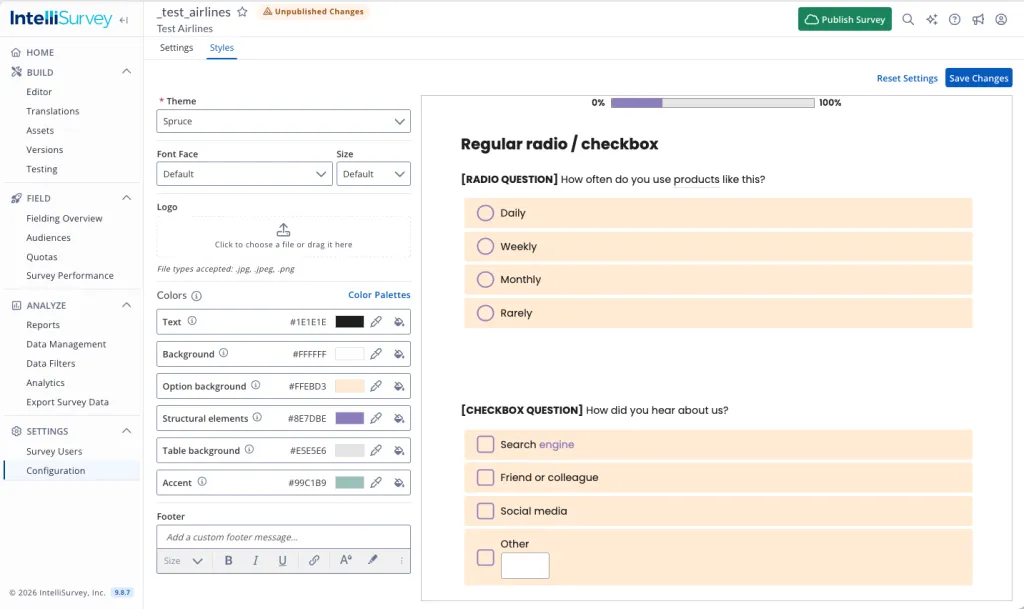
Introducing Survey Styles
Styles allows you to customize the look of an individual survey without changing the system theme it’s based on. Adjust colors and other style settings, see the results in a live preview as you go, and save when you’re happy — the parent theme stays untouched for every other survey that uses it.
Note: A survey’s theme is now chosen in Styles. The Theme dropdown has been removed from Survey Configuration for existing surveys, though it remains available when creating a new survey.
Updates to ISPL
We’re continuing to introduce clearer alternatives for some of our tags, making ISPL easier to read for new users and for AI-assisted programming. The original tags continue to work.
open end entrymay be used in place ofautoother, including its related tags (e.g.,open end entry placeholder)reporting descriptionmay be used in place ofdescdecline to answer rowsanddecline to answer colsare now aliases fordta rowsanddta cols(ordta columns)conditioncan now be used universally for conditional logic, whereveriforshow ifis used today
Additionally, automatically detect and redact personally identifiable information with redact pii: y. This tag can be applied to text and textbox questions and tables, and will redact the stored data in real time as respondents answer.
Improvements and Bug Fixes
IntelliBuilder Refinements
- A new Scale Layout property brings ISPL’s
scaleandscale directioncontrols into IntelliBuilder, so you can lock rating options into a row or column and set or randomize their order without writing code - Programming comments no longer appear as blank or placeholder widgets in IntelliBuilder or the Word download; they remain in the ISPL source
- AI option generation now takes the survey’s primary country into account
- The AI Copy Editor is now called CopyEditor
- Comment Excel exports and digest emails show times in your own time zone
- Lists without decorators now display as a simple numbered list rather than a two-column table, both in IntelliBuilder and in Word exports; lists that do have decorators are unchanged.
- Tidied up expand/collapse behaviour across IntelliBuilder: a single “Expand All / Collapse All” toggle now reflects whether anything in the survey is collapsed, and collapsing a group no longer changes the expanded/collapsed state of the questions inside it.
- Clicking anywhere on a collapsed question’s toolbar now expands it, rather than only the small arrow icon.
- Moved the “Expand All / Collapse All” control to sit with the other expand/collapse controls on the right of the toolbar, instead of the top left.
- Made button sizing, spacing, and collapsed-question text styling consistent across all four IntelliBuilder views.
- Added a
[ CALCULATED VALUE: … ]directive in IntelliBuilder so a question’s calculated value is shown clearly, rather than only visible as raw ISPL.
Honorable Mentions
- Izzy can now use custom skills uploaded to My Skills
- The “Recalculate” action returns to Weights, so platform-built weights can be refreshed as new data arrives
define audience typescan now set a locale per audience type, enabling auto-sample requests for multi-country surveys- Fielding Summary now reports median LOI for completes, alongside a separate row for all statuses
- Audience Quotas accept a variance of 0%
- SPSS (.sav) exports present masks on checkbox questions and tables more cleanly
Bugs
IntelliBuilder
- Fixed an issue where researchers could see the CopyEditor button in IntelliBuilder but got an error if they tried to use it.
- Fixed an issue where editing a question’s text inline and then collapsing/expanding widgets could make the edited question appear to disappear.
- Fixed an issue where switching a survey from ISPL to IntelliBuilder opened it in Source view instead of Build view.
ISPL Editor & Tags
- Parsing indicator: “View Results” works when already on the results page, and links persist after a browser refresh
- Cloning a survey shows the “Go to survey” button in the progress indicator again
- A group named “RETURNING” no longer causes a cryptic compile error
ai gibberishsummary fields (QGIB_*) always calculate, even when placed after the completetype: ai probeworks with question tags andshow if
Survey Taking
- Uploads that exceed the size limit for videos now fail with a clear message
- Info-icon descriptions display in the respondent’s language after translations are applied
- Highlighter questions scroll properly on iOS devices
- Authorized IDs work correctly with
single page: y - DFIQ no longer shows a blank page in Test Mode when question logic references questions on the same page
set textno longer breaks theexplaindecorator, including in Maple- Questions with both
footnoteandwhyno longer show two footnotes - The feedback box and Maple theme controls now display translated text
Reports and Exports
- Fixed Frequency crashing on DTA fields for loop questions when the driving list has quotes/apostrophes
- Saved crosstabs no longer share a tab book, and digest crosstab sheets show the correct rows after “Save As New”
- Crosstabs no longer shows “No data” when including unused checklists
- Charts: NPS Score fields for
type: nps_tableload correctly - Charts: filters stay in the Settings drawer after collapsing it
- Charts: rank parent questions show the correct chart type options
- Charts display in the correct order in Firefox
- In Response reports, “Show Description” setting is maintained in a saved report
- Newly added weights and open-end coded fields will appear in Exports and reports without a refresh
- “Download current fields” data maps respect the Filter by Field Type setting
Other
- Data cuts: questions properly appear in the New Data Cut (Field) dropdown after a reload. Additionally, there are more operator options for $trans_id
- Contact Lists: Bug fixes to the filter drawer (list view) and field picker (Frequency view)
- AI open-end coding only counts responses as coded when they have a valid theme, and flags any that were skipped
- Sheets: improved copy functionality beyond the first page
- NPS and NPS table headings appear in the Excel translation overlay
- Test Mode autofill follows rank question rules
- Simulated data respects
show ifon ranking questions - Izzy reports accurately when it can’t navigate to a page
- Saving a user with an email that’s already registered now shows a clear error instead of a stuck spinner