Release Notes: 9.8.4

IS Pro’s latest release, 9.8.4, includes an overview of your survey usage across time periods, an overhaul to Charts, an improved comment center for IntelliBuilder, and grouping of panel sources for better field manageability, among other updates.
Reports
Charts sees major overhaul
Within Charts, you may now curate a collection of charts in a single view, saving them as a single, sharable report. This newer functionality allows you to build cohesive narratives and share survey insights more efficiently.
Note: The updated Charts engine does not support older, saved charts. To maintain access to your existing work, we have preserved the previous version under the name Legacy Charts. However, Legacy Charts will be retired in version 9.8.5, and we recommend moving to the new Charts tool soon.
Custom Tables improvements
As Custom Tables undergoes continuous improvements, we’ve introduced support for ranking fields, select lists as columns, and compatibility with net/metrics summary tables. Additionally, users can now re-order rows, among other updates and bug fixes.
Additionally,
- In Frequency reports, granular control over decimal points within the report has been added
- Response reports no longer have issues with displaying HTML formatting
Survey Building
Redesigned IntelliBuilder Comments & Comment Center
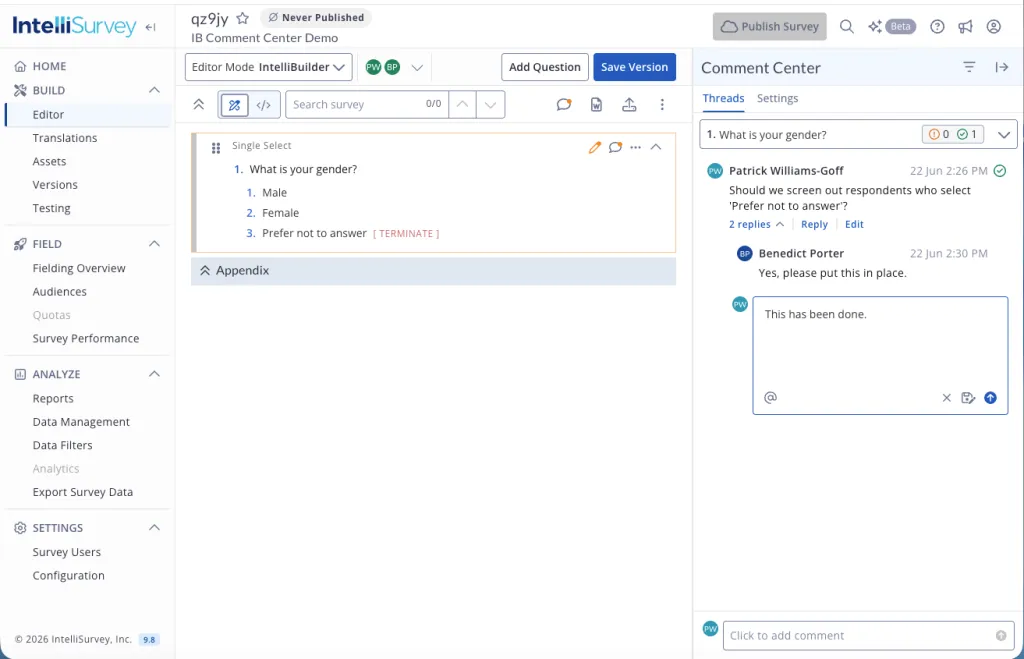
The IntelliBuilder comments experience has been overhauled to make collaboration faster and more intuitive. A new, dedicated Comment Center now gives you a single place to view and manage all comments across your survey, displaying every widget that has comments, along with counts of unresolved and resolved threads.
Clicking any entry scrolls the survey to that widget automatically. Users may also post and review comments directly from individual widgets, without needing to open the full Comment Center.
New privacy & visibility controls mean authors can restrict visibility to specific individuals by email or entire groups of individuals, ensuring sensitive discussions are only seen by the right people.
Group panels for monitoring
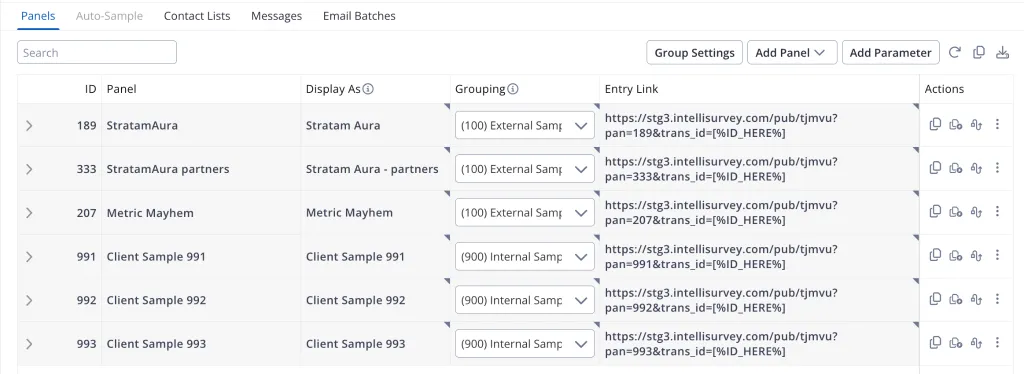
Introducing Panel Grouping, which allows for bundling multiple panel sources together within Panels, enabling quota caps to be set at the group level. This functionality promotes a cleaner, more professional view for clients while keeping granular data accessible.
ISPL
Our internal programming language has been renamed from Survey Programming Language (SPL) to IntelliSurvey Programming Language (ISPL). While fairly interchangeable, we’ve updated wording throughout the platform.
Automate country variable creation
To streamline multi-market surveys, we have introduced the **country picker** tag, which will automatically populate a radio question with countries from the survey’s configuration. When paired with language picker, it takes the complexity out of testing multi-market surveys.
Improvements to loop summaries
Summarize the options checked in any iteration of a loop with loop option punch summary, the complement to loop punch summary. Where **loop punch summary** may be used to aggregate which loop iterations had a certain option selected, loop option punch summary may be used to aggregate which options were selected in any iteration of a loop.
In the example below, variable QFAMILIAR will indicate all stores checked “familiar” in Q1, whereas QPRODPURCH will list all products purchased in Q2 across all loops.
set list: STORES
1. Advance Auto Parts
2. AutoZone
3. Napa Auto Parts
4. Pep Boys
5. O'Reilly Auto Parts

start group: Q1_2_GRP
loop for: STORES

1. How familiar are you with ~text~?
type: radio
loop punch summary: QFAMILIAR. Parts store familiar with {if anyChecked($Q1,3)} {if none punched: 99. No stores selected}
1. Never heard of
2. Heard of, not that familiar
3. Familiar

2. Which parts have you purchased at ~text~ in the past?
type: radio
showif: anyChecked($Q1,3)
loop option punch summary: QPRODPURCH. Products purchased in the past -[99]
1. Batteries
2. Brakes
3. Oil
..
14. Windshield wipers
97. Other, not listed
99. Never purchased from ~text~

end group: Q1_2_GRP
Both loop punch summary and loop option punch summary may be used on standalone looped questions, or on questions looped in a group.
Introducing Usage Summary
Keeping track of your account activity just got much easier with our new Usage Summary tracking. Understand your team’s usage using month-over-month graphs or drill down into custom time frames. Want to see exactly where your volume is coming from? Check specifics on a per-survey level, including a side-by-side look at responses vs. completes and a count of total emails sent over time. It’s never been easier to monitor your account volume.
Note: this feature available to users with system role of Superuser or System Administrator
Email Improvements
We’ve updated Contact Lists and Email Batches to provide better clarity into batch timing, performance, and individual recipient statuses.
- Batch status tracking: Batch fields within Contact Lists are easier to digest, featuring very clear recipient status results plus insight into bounce reasons
- Batch send time: ‘Scheduled Start’ has been replaced with ‘Send Time’ reporting a batch’s send time, whether past or future.
- Sent count: See how many emails have been sent across the survey at-a-glance
We’ve also resolved a few bugs, to ensure consistent reporting between Batch Details and Contact List reports, as well as accurate batch counts when filters are edited.
Honorable Mentions
- Survey Users: quotes will be automatically stripped out when pasting in email addresses from certain email clients
- Encryption removed from DFIQ variables
- Maple sees continued updates and improvements
- In-platform progress indicators will auto-close after 60 seconds when they end in success
Bugs
- Using
**singlepage**with **inline_dta**s occasionally resulted in data loss in specific situations; fixed - Surveys may now be published when translation names contain special characters
- Headers should now match when scale: flip is used on vertical-mode tables
- Exports should always include trans_id regardless of options selected
- Additional fixes for
dta_colwith radio/checkbox tables