Release Notes: 9.8.3

Our 9.8.3 release delivers powerful updates across the platform, highlighted by the introduction of Izzy, our next-generation AI assistant, designed for enhanced performance and streamlined workflows. This release also contains updates for towards survey building efficiency, introducing features like survey cloning, improvements to **scale** questions and an updated Properties section within IntelliBuilder. Finally, you’ll find enhancements in reporting, including an improved logic builder for Custom Fields and the new ability to edit saved exports.
Introducing Izzy
Building on the foundations of our initial AI assistant, Intellix, we are pleased to announce our new, improved AI assistant, Izzy. Designed for enhanced performance, scalability, and broader functionality, Izzy represents a significant step forward in our integrated AI capabilities.
Key Improvements & Features:
- Enhanced Performance: Improved intelligence and system stability for a smoother user experience.
- Advanced Conversion: Significantly improved doc-to-SPL conversion logic.
- Streamlined Workflows: Use Izzy to navigate around the platform and kick of tasks, such as report setup.
Interested in learning more about Izzy? Connect with your account manager or email support@intellisurvey.com for more details, package options, and next steps.
Survey Building
Quick survey duplication with “Clone Survey”
Surveys may now be fully replicated, copying over all elements: translations, sheets, images, CSS, custom theme files, quota caps, panel settings, and more! Within moments of selecting “Clone Survey” from the Survey Navigator, the cloned survey should be available and ready to use.
SPL
Horizontal or vertical **scale** questions have enhanced functionality, including the ability to flip the scale dynamically on a respondent-by-respondent basis, while keeping heading position intact.
Additionally, checkbox options will now store based on the order in which they are checked rather than the order in which they are displayed, giving more insight into respondent’s answering choices. The results are viewable within Response Reports.
IntelliBuilder
IB survey building is now more intuitive through editor updates that mirror the simplicity of Summary View. These enhancements reduce clutter, remove unnecessary labels, reorganize tools, and add tooltips to improve focus and discoverability.
Properties and attributes are streamlined: properties now reside in an accordion with a counter, carat, and directive tooltips. New properties can be added via a bottom link. The attributes pulldown similarly features a counter and an explorer showing applied lozenges and all available options.
New Testing Tool: URL Parameters
Speed up your testing process with the “Add URL Parameters” tool, accessible via Testing menu or Survey Links. Enter your test ID or parameters and they will be appended to the end of the selected link for immediate use.
Reporting
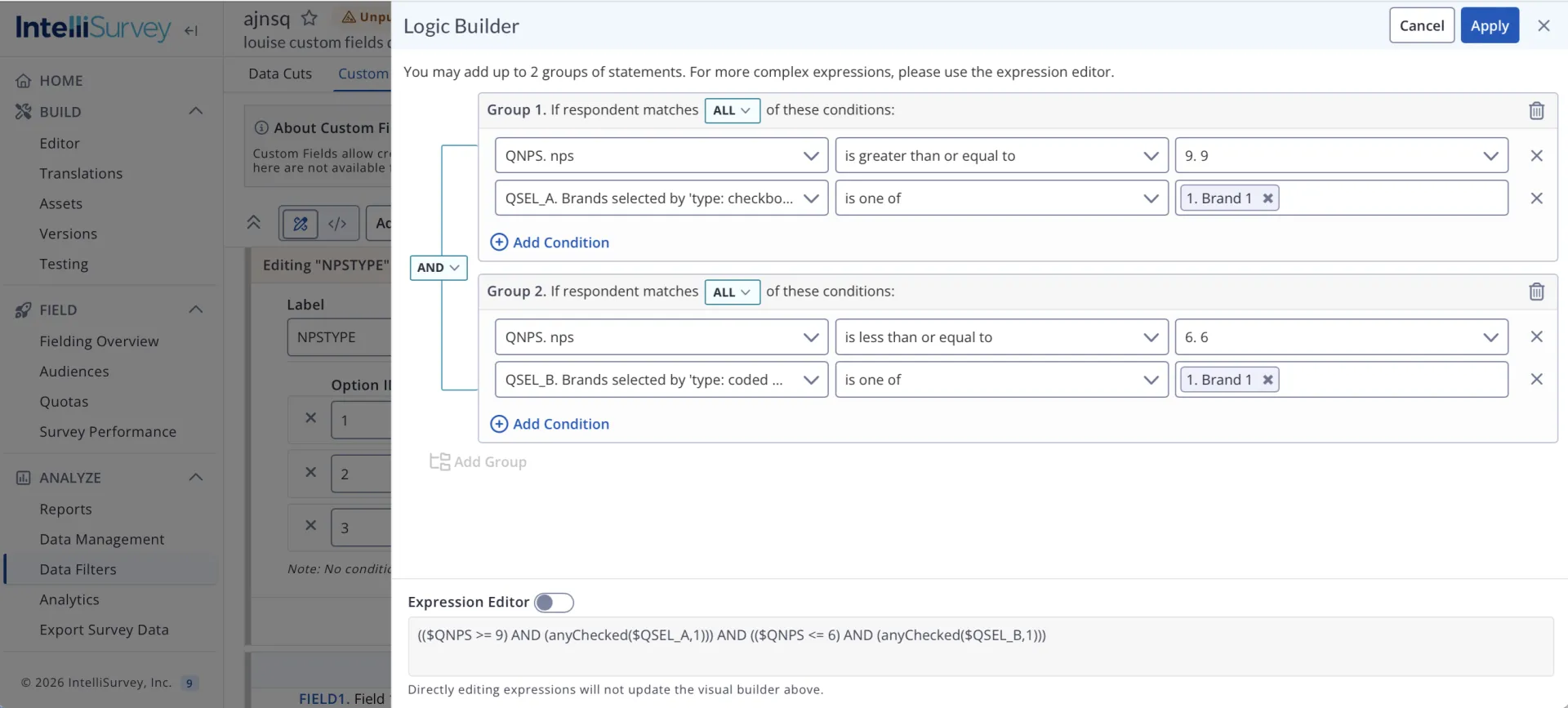
Logic Builder in Custom Fields
Building conditions within Custom Fields is more intuitive with an updated logic builder interface.
Record Filters
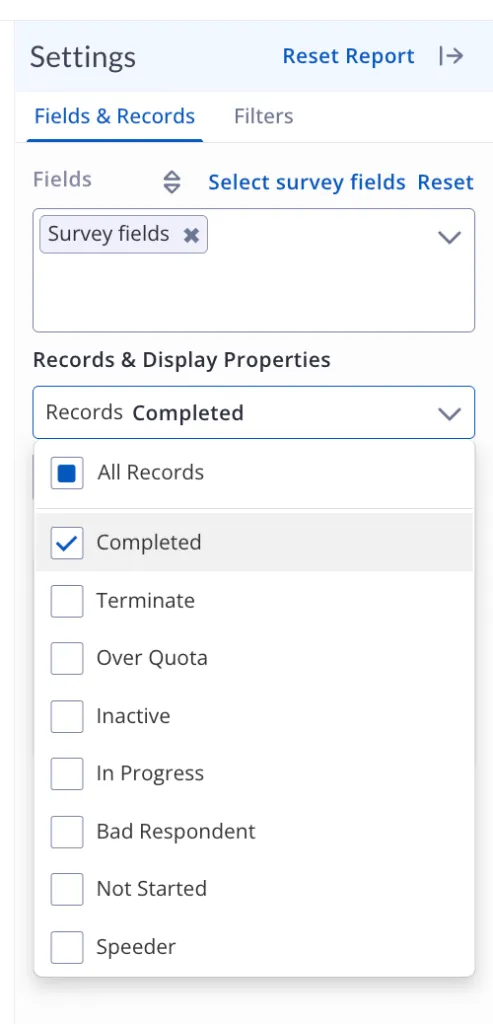
The Record Status filter now surfaces additional relevant statuses. The dropdown will always display Completed, Terminate, Over Quota, Inactive, and In Progress, and will dynamically show any additional statuses when records exist for them.
Editing Exports
Saved exports can now be edited and re-saved to the Deliverables section.
Honorable Mentions
Reports
- Crosstabs now include decimal formatting controls in the Advanced tab to enable more flexibility over how percentage and numeric values are displayed in reports
- Individual Response Reports now include an updated Settings to mirror other reports
- Page Reports, Base Counts, and Exports now feature an updated Filters drawer for to mirror other reports
IntelliBuilder
- US Zip Code question widgets now support ‘Term if’ & ‘Term After’ properties
- Variable labels now align to the top of the question widget for improved readability
Other
- Search and Filter results preserved when navigating away in Survey Navigator and System Users
- Testmode: Show assembled variable labels for loops
- Further guardrails created when using HTML editing in Messages
- When uploading files, you’ll see clearer error messaging for problematic file names
Bug Fixes
Build / SPL Bugs
- Alphabetized lists from sheets now display all options correctly when downstream variables are selected by weights
- Translations will be unchained and appropriately appear in the overlay when translate tag is used for specific languages or for downstream questions/lists
- CheatSweep’s
**pasted_xxx**fields now function correctly when**singlepage: y**is enabled - SPL
preceding page textnow displays properly with Highlighter questions - The
**{text:}**list decorator now works with derived lists - Surveys with multiple loops now display the second loop correctly
- In the Spruce theme,
**inline dta**now displays correctly in radio questions with columns
Reports Bugs
- Significance testing in a saved crosstab now works properly when only one percentage is selected
- Standard users can now access trend charts
- Charts now display correct percentages when weights are applied
Other
- System Users: Fixed issue with disabled actions at certain times