Release Notes: 9.8.2

IntelliSurvey’s latest release, 9.8.2, contains a series of improvements to our platform. Highlights include a significant update to IntelliBuilder’s Summary View, control over authorizing respondent access to surveys, a cleaner way to view comparing concepts and brands, and AI assistance in reviewing data quality of respondent answers.
Survey Building
IntelliBuilder
Summary View: Enhanced Basic Editing
The IntelliBuilder (IB) Summary View now offers a full suite of basic editing tools, expanding in-line capabilities. This speeds up content development and reduces the need for programming by simplifying survey building.
- Add new question widgets directly and edit placeholder text.
- Clicking an editable field auto-selects text for immediate typing.
- Content saves automatically in real-time, minimizing loss risk.
Intuitive Keystroke Shortcuts
- Tabbing: Cycles focus between widgets.
- Cursor Keys (Up/Down): Moves through options/rows/columns.
- Enter/Return: Moves to the next empty field; adds a new empty field at the end of a list.
- Shift + Enter: Inserts a new, empty field between existing options.
- Backspace/Delete: Clears current field text; a second press when empty deletes the field.
Access is granted to users with the IntelliBuilder Basic Editing permission or higher.
SPL & Parser
Two New AI Tags
- The
ai gibberish: ycan be applied to text input fields to automatically detect gibberish responses using AI. Each field with the tag generates a derived radio question that evaluates the response, along with four survey-level summary questions that track gibberish counts across all tagged fields. - The
ai sentiment: ytag can be applied to text fields to automatically categorize response sentiment using AI. Each field with the tag generates a coded single-select question that evaluates the sentiment of the response.
The new grouping decorator allows options within a list to be treated as a single unit for the purposes of randomization, akin to creating anonymous collections.
The new preceding page text tag allows text attached to a question to be displayed on its own page before that question.
Reports
Custom Tables
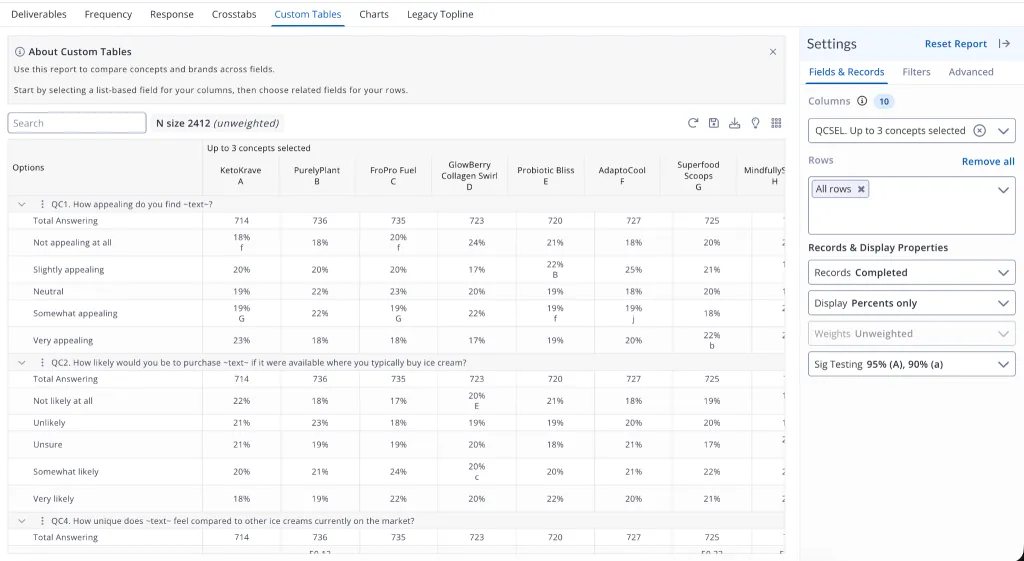
Custom Tables (Beta) is a new report designed to compare concepts and brands across fields more efficiently. While it shares much of the same functionality as Crosstabs, Custom Tables optimizes how data is displayed for looped fields. Instead of navigating large grids, related data is grouped and condensed into a more focused view—making it easier to spot meaningful comparisons.
To get started, users select a single column field and then choose from the relevant row options that appear.
Note: A reparse of your study may be needed to ensure the appropriate fields are selectable as columns and rows.
Email Improvements
Authorized IDs
We’ve reintroduced “Required IDs” back into the platform under a new, clearer name, Authorized IDs.
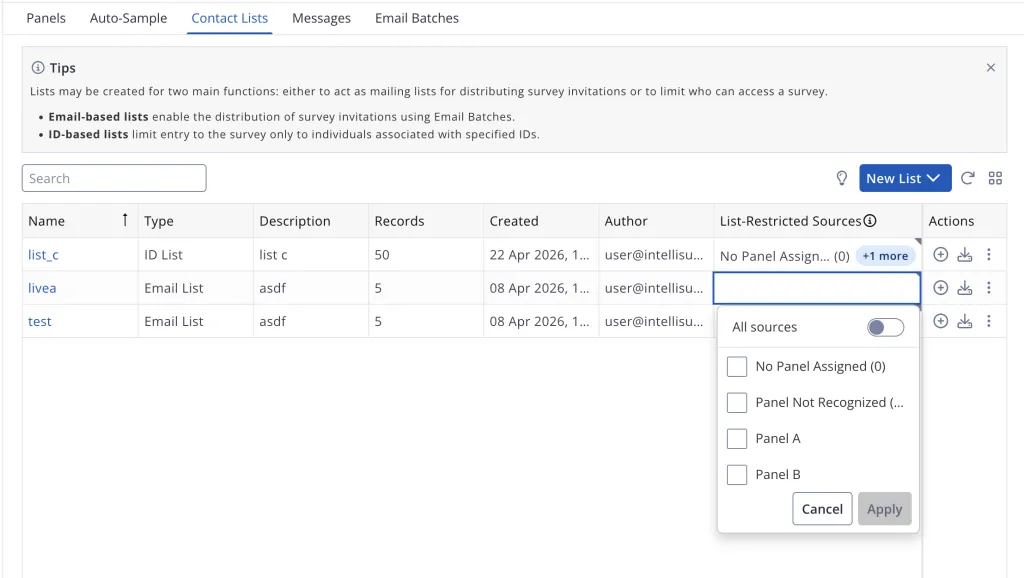
Authorized IDs will restrict entry into the survey, allowing only respondents with a $trans_id value that matches an ID in an authorized list. Authorized lists are generated within Contact Lists; lists may be either ID-based (a list containing only IDs intended for use with Authorized IDs) or email-based (a list contains email addresses used for sending survey invitations, but will also be used for authorization). Once lists are created, entry into the study may be restricted for all sources, or for specific panels (pulled in from Panels), when set via the List-Restricted Sources column.
Contact List Linking
We’ve improved error messaging and reporting when uploading an incorrectly formatted Questions tab. Furthermore, users are now able to specify which fields should be encrypted within the survey database to safeguard linked Personally Identifiable Information (PII).
Other Improvements
To improve deliverability of emailed survey invitations, the “From Email” field in Messages is now restricted to email domains properly registered to each server. Likewise, when using the send email widget in a survey, the “From Email” must also match registered domains. These steps help to maintain a positive environment, allowing for reaching more respondents.
Additionally, users should see major performance improvements when using large contact lists, especially when setting filters.
Honorable Mentions
- In very large surveys, the max capacity is automatically set to 50 only the first time it is published; subsequent publishing will only result in a caution
- In IB, the ‘Add Question Element’ drawer has been updated with a cleaner layout, clearer section names, and more logical grouping of question types
- Survey creators can now enable quota creation for Table Summary Variables in IB through the Optional Settings
- PowerPoint exports are now supported for Frequency Reports
- Non-ASCII export formats will now include all open-ended responses when included in datamaps
- Documentation homepage may be reached directly from the in-platform documentation pane
Bug Fixes
SPL & IB Bugs
- When using
selectby: steps, an individual step uses the overall counts for the parent variable, not just the counts for that step term afternow functions correctly with list functions- Using
header: yto define a collection header will not result in an incorrect warning loop forproperty now displays in the correct IB section- IB now loads successfully even when SPL system classes lack an underscore in the name
- ‘Collection Headers’ render correctly in IB Summary and Edit Views
- Widgets with option image properties now render correctly in the Summary View
- ‘Piped Text’ and ‘Display Text’ widgets support HTML and Markdown tags
- ‘Decline to Answer’ option ID field now accepts longer IDs
Other
- Open End Coding now supports both English and translated rows in text tables
- Comparison groups are now visible in the Field Sorter
- Checkbox questions will now display just once in the Questions tab of the data map
- Fixed an issue that caused data cuts to disappear in saved reports
- For SPSS exports with vertical scale (
vscale) radio table questions, reports now properly show the question text followed by the column text as it does for table rows - Field sizing for text questions using
allow voicewidget with Spruce will properly display - Themes using Quality or Spruce now correctly display radio tables in Testmode
- Checkbox or radio tables with
dta colwill now present as expected - Tables will properly wrap to other display modes when screen/viewport changes size
- Better wrapping for lengthy question text when using
show image - Fixed issue with improper recording of
pasted_fieldsandpasted_counts
9.8.2 is scheduled to begin releasing on April 28, 2026.