Release Notes: 9.8.1

Our 9.8.1 update provides enhancements across survey creation, programming, and reporting tools. Key changes include powerful new Survey Programming Language (SPL) tags—such as ai probe for dynamic follow-up questions—and the integration of Contact List fields into survey data. Many smaller improvements will lead to big impact. Keep reading for a dive into our changes.
Survey Building
IntelliBuilder
Survey Builder UI & System Class Enhancements
We’ve streamlined how System Classes are displayed and handled in IntelliBuilder. These changes are designed to reduce visual noise, prevent accidental overrides of standard logic, and improve the clarity of table configurations.
Cleaner Workspace Rendering
Previously, applying a system class (such as add_to_100_percent_ifblank0) would display every underlying technical property and directive inline. We’ve moved away from that “mouthful” of text. Now, the builder will only display the Class Description and relevant Instruction tags, keeping your survey editor clean and easy to read.
Smart Instruction Handling
To ensure survey consistency, we’ve updated how instructions interact with system classes:
- Protected Logic: System-level instructions carried over from a class are now read-only to prevent accidental changes to standard class behavior.
- Flexible Overrides: If you need a unique message, adding a local instruction tag will automatically override the system default and remain fully editable.
Enhanced “Add to 100%” Tables
For tables using add_to_100* system classes, we’ve automatically added a “Total” row. This provides immediate visual feedback to respondents (and researchers) that the inputs must satisfy a 100% sum requirement.
Clearer Class Naming
We’ve updated descriptions for clarity. For example, std_checkbox_exclusive99 is now clearly labeled as MULTIPLE SELECT WITH EXCLUSIVE (99).
SPL & Parser
Revisit parse results
The results after a parse (successful or not) are valuable–and now are able to be re-accessed without resubmitting a survey. Accessible anytime via a new action in the SPL Editor, the results page will display any errors and metrics from the last submission.
Updates to collection headers
To add functionality, we’ve adjusted how collection headers can be created.
Rather than using [header: n] or [header: only], programmers should now reference this as [show collection headers: n] and [show collection headers: only].
This change will mean updating source code where [header] is used. 📣
Because of this change,
show collection headers: ncan now be used at the question level with inline options, as well as applied directly to individual collection headers.- Blocks can now be created with
[show collection headers: only]lists
Use AI to get deeper open-end insight
Introducing ai probe, an optional tag for open-end text questions that uses AI to tailor common follow-up questions to gain deeper insight into the question at hand, and presents the final response as combined dialogue.
Other SPL Improvements
allow voice: yenables survey respondents to use their voice to respond to textbox type questions.autocode rowsandautocode columnsallow streamlined way to automatically set the value of table rows/columns.- Closed-end option decorator,
offset: y, allows options to be rendered separately from other options (similar to DTA). flagcan now be used with single-line approach for validations.
Integrated Contact List fields
You can now seamlessly integrate fields from Contact Lists within your surveys via ‘linking’. Linked Contact List fields will display alongside survey data for use in reports, exports, or even conditional branching and other survey logic.
Reports
Response Report
Ordering restrictions are removed for the Field Sorter in the Response Report.
Charts
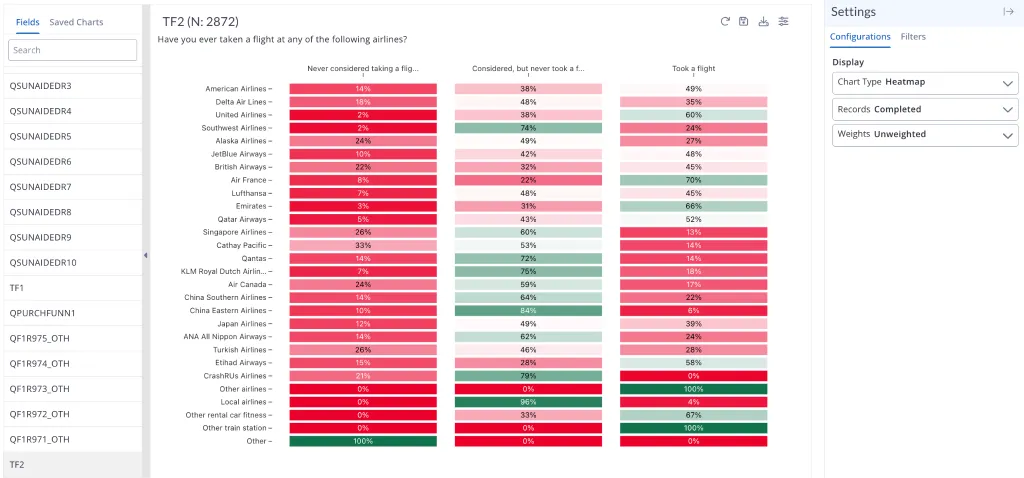
Heat matrix visualizations are now available in Charts for close-ended parent fields (table, block, and loop question types).
Honorable Mentions
- Color-coding indicating percentage to completion is now available for crossed quotas
- Ability to copy data from grids with or without the headers
- Columns tag can control carousel table options layout
- Quotas with custom quotabase have updated view within Quotas
- In Crosstabs (Advanced tab), nets and metrics summary tables now automatically follow the sequence defined in your “Display Order” settings for consistent data presentation. This ordering logic applies across parent fields, excluding “Total Answering” and “Answer Options” where summary tables are not applicable.
Bug Fixes
- In-survey language picker is toggled “off” by default, and uploading new translations will maintain the in-survey picker status
- Issues related to timestamps throughout platform when user has self-selected timezone
- Fixed issues within IntelliBuilder regarding Researcher
- Better handling of re-authentication upon timeout
- Numerous fixes to respondent survey interface
- Parser no longer reports on non-existent fields
- Custom Fields previously did not update counts in Frequency reports; counts will now update
- Search box added back to the Add Panel action in Panels
- Crosstabs now accurately preserve percent and count configurations within saved reports
- Sorting in Crosstabs no longer gets stuck when switching from descending total
Release of 9.8.1 started on March 26, 2026.