Release Summary: 9.8.7

Our 9.8.7 release introduces Survey Styles for customizing the look of an individual survey, a new set of clearer ISPL aliases, and a round of IntelliBuilder refinements, among many other items.
Survey Building
IntelliBuilder
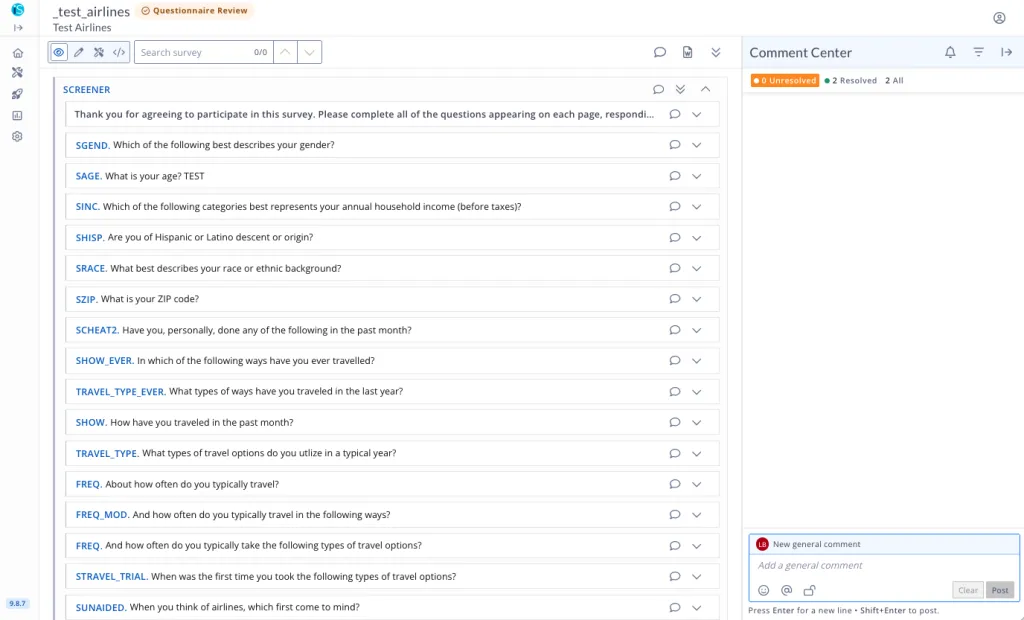
Four editing views for IntelliBuilder – Review, Edit, Build, and Source
IntelliBuilder now offers four distinct views of a survey, each opening up a bit more editing power than the last:
- Review – read-only, for checking question wording and adding comments
- Edit – adds inline text editing and CopyEditor
- Build – today’s full visual editor
- Source – full ISPL access
Which views someone can reach depends on their permissions, so reviewers, copy editors, and survey builders each land in the view that matches what they’re allowed to do.
Each view also has its own dedicated link (e.g. /visual/edit, /visual/build), so you can send a collaborator straight to the exact stage you want them looking at rather than a generic survey link. Review has also been expanded to show basic question logic – Term if, Qualify if, Show if, Skip if, and option Terminate/Qualify flags – that was previously only visible in the full editor, so reviewers can now see the full picture without needing edit access.
Introducing Survey Styles
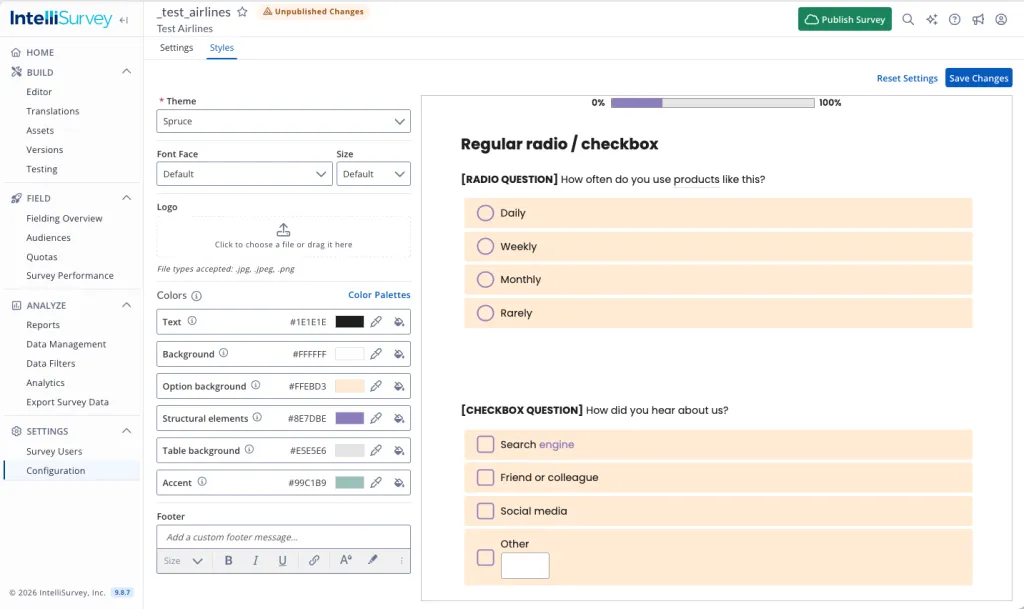
Styles allows you to customize the look of an individual survey without changing the system theme it’s based on. Adjust colors and other style settings, see the results in a live preview as you go, and save when you’re happy — the parent theme stays untouched for every other survey that uses it.
Note: A survey’s theme is now chosen in Styles. The Theme dropdown has been removed from Survey Configuration for existing surveys, though it remains available when creating a new survey.
Updates to ISPL
We’re continuing to introduce clearer alternatives for some of our tags, making ISPL easier to read for new users and for AI-assisted programming. The original tags continue to work.
open end entrymay be used in place ofautoother, including its related tags (e.g.,open end entry placeholder)reporting descriptionmay be used in place ofdescdecline to answer rowsanddecline to answer colsare now aliases fordta rowsanddta cols(ordta columns)conditioncan now be used universally for conditional logic, whereveriforshow ifis used today
Additionally, automatically detect and redact personally identifiable information with redact pii: y. This tag can be applied to text and textbox questions and tables, and will redact the stored data in real time as respondents answer.
Improvements
IntelliBuilder Refinements
- A new Scale Layout property brings ISPL’s
scaleandscale directioncontrols into IntelliBuilder, so you can lock rating options into a row or column and set or randomize their order without writing code - Programming comments no longer appear as blank or placeholder widgets in IntelliBuilder or the Word download; they remain in the ISPL source
- AI option generation now takes the survey’s primary country into account
- The AI Copy Editor is now called CopyEditor
- Comment Excel exports and digest emails show times in your own time zone
- Lists without decorators now display as a simple numbered list rather than a two-column table, both in IntelliBuilder and in Word exports; lists that do have decorators are unchanged.
- Tidied up expand/collapse behaviour across IntelliBuilder: a single “Expand All / Collapse All” toggle now reflects whether anything in the survey is collapsed, and collapsing a group no longer changes the expanded/collapsed state of the questions inside it.
- Clicking anywhere on a collapsed question’s toolbar now expands it, rather than only the small arrow icon.
- Moved the “Expand All / Collapse All” control to sit with the other expand/collapse controls on the right of the toolbar, instead of the top left.
- Made button sizing, spacing, and collapsed-question text styling consistent across all four IntelliBuilder views.
- Added a
[ CALCULATED VALUE: … ]directive in IntelliBuilder so a question’s calculated value is shown clearly, rather than only visible as raw ISPL.
Honorable Mentions
- Izzy can now use custom skills uploaded to My Skills
- The “Recalculate” action returns to Weights, so platform-built weights can be refreshed as new data arrives
define audience typescan now set a locale per audience type, enabling auto-sample requests for multi-country surveys- Fielding Summary now reports median LOI for completes, alongside a separate row for all statuses
- Audience Quotas accept a variance of 0%
- SPSS (.sav) exports present masks on checkbox questions and tables more cleanly
- Data cuts offer more operator options for $trans_id